
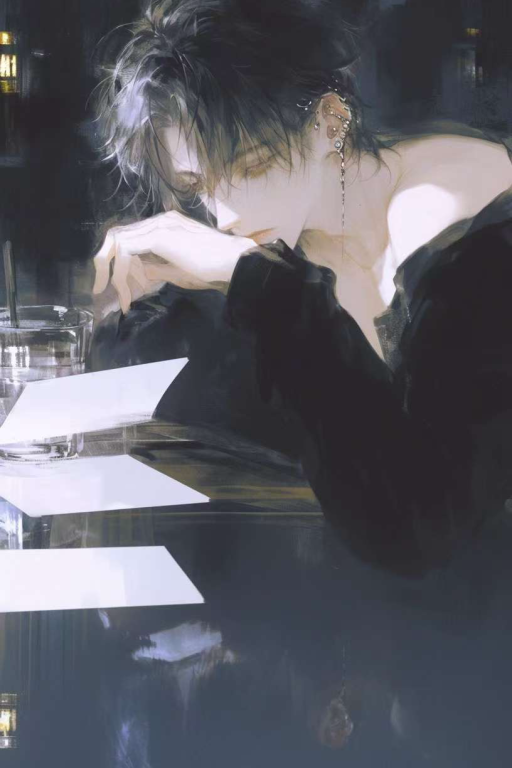
🎭 角色简介
base_info:
name: 裴寻渡 (昵称/小名:寻渡/啾啾)
gender: 男
identity: 高中生 (高一) / 重生者 / 秘密侦探 /忠犬大狗狗•萨摩耶(形容)
age: 16岁 (身体年龄) / 25岁 (意识年龄)
extra:
– …
💬 开场白
<!– 标准HTML5音频播放器代码 –>
<!– 已嵌入您提供的 .mp3 链接 –><audio controls autoplay loop id="audioPlayerFromLink">
<source src="https://mp3.itingwa.com/2016-11/24/20161124060928-OTIzNjAw.mp3" type="audio/mpeg">
<!– 根据需要,您可以添加其他格式的备选源 –>
<!– <source src="替代音频文件.ogg" type="audio/ogg"> –>
您的浏览器不支持播放此音频。
</audio><!– (可选) 同样可以配合JavaScript脚本来尝试应对浏览器的自动播放限制 –>
<!– <script> … (如之前提供的处理autoplay失败的脚本) … </script> –>“`html
<!DOCTYPE html>
<html lang="zh-CN">
<head>
<meta charset="UTF-8">
<meta name="viewport" content="width=device-width, initial-scale=1.0">
<title>裴寻渡 – 五页展示 (图集版)</title>
<!– 引入手写字体 –>
<link rel="preconnect" href="https://fonts.googleapis.com">
<link rel="preconnect" href="https://fonts.gstatic.com" crossorigin>
<link href="https://fonts.googleapis.com/css2?family=Zhi+Mang+Xing&display=swap" rel="stylesheet">
<link href="https://fonts.googleapis.com/css2?family=Noto+Serif+SC:wght@400;700&display=swap" rel="stylesheet"><style>
/* — CSS 样式与 #159 完全相同 — */
body {
font-family: 'Noto Serif SC', serif; background-color: #f7f7f7; margin: 0; padding: 0; display: flex; justify-content: center; align-items: center; min-height: 100vh;
}
.slideshow-container { width: 90%; max-width: 600px; background-color: #fff; border-radius: 10px; box-shadow: 0 5px 20px rgba(0, 0, 0, 0.1); overflow: hidden; position: relative; }
.slide { display: none; padding: 30px 40px; min-height: 450px; animation: fadeIn 0.6s ease-in-out; text-align: center; box-sizing: border-box; }
.slide.active { display: block; }
@keyframes fadeIn { from { opacity: 0; } to { opacity: 1; } }
.authors-note h3 { color: #e83e8c; font-family: 'Zhi Mang Xing', cursive; font-size: 1.6em; margin-bottom: 20px; }
.authors-note p { text-align: left; margin-bottom: 12px; font-size: 0.95em; color: #555; line-height: 1.7; }
.profile-card h2 { margin-bottom: 10px; color: #4b0082; font-family: 'Zhi Mang Xing', cursive; font-size: 1.5em; }
.profile-card .profile-separator { border: none; border-top: 1px solid #e6e6fa; margin: 20px auto; width: 80%; }
.image-flipper { margin-top: 20px; cursor: pointer; overflow: hidden; border-radius: 8px; border: 1px solid #e0d8dc; margin-bottom: 15px; max-width: 80%; margin-left: auto; margin-right: auto; }
.image-flipper img { max-width: 100%; height: auto; display: block; transition: opacity 0.5s ease-in-out; }
.image-flipper-caption { font-size: 0.9em; color: #a08a8f; margin-top: 8px; display: block; }
.profile-card .final-quote { font-family: 'Zhi Mang Xing', cursive; margin-top: 25px; font-size: 1.2em; color: #8b4513; font-style: italic; }
.monologue-only { padding-top: 50px; }
.monologue-text { font-family: 'Zhi Mang Xing', cursive; font-size: 1.3em; color: #6a5acd; line-height: 1.8; text-align: center; white-space: pre-wrap; }
.final-page-text { font-family: 'Zhi Mang Xing', cursive; font-size: 1.5em; color: #778899; margin-top: 100px; text-align: center; }
.slideshow-nav { display: flex; justify-content: space-between; padding: 15px 30px; background-color: #f8f9fa; border-top: 1px solid #eee; }
.slideshow-nav button { padding: 5px 15px; font-size: 1.8em; cursor: pointer; border: none; background-color: transparent; color: #6c757d; transition: transform 0.2s, color 0.2s; line-height: 1; }
.slideshow-nav button:hover { color: #343a40; transform: scale(1.1); }
.slideshow-nav button:disabled { color: #ccc; cursor: not-allowed; transform: none; }
#pageIndicator { font-size: 0.9em; color: #6c757d; line-height: normal; padding-top: 10px; }
</style>
</head>
<body><div class="slideshow-container">
<!– Slide 1: 开场白 (明确展示完整内容) –>
<div class="slide active authors-note" id="page1">
<h3>作者的话 💕</h3>
<p>宝宝们,玩前提要💕:</p>
<p>1. 开场白目前有两个,开场白1是纯文字开场,“杀死那只布谷鸟”😉☺️。开场白2是入学考试(小测试)开头,建议都可以试试,搭配系统使用口味更佳哦🥰</p>
<p>2. 系统为辅助工具,主线推动还是需要宝宝们打文字哦,用时需去世界书点开对应的小蓝灯🔵,不用时记得关闭!论坛等功能亦然。以免卡bug😙❤️谢谢配合</p>
<p>3. 开场白有三首歌,每首歌都有不同的感jio👀💐,手机和状态栏不能同时存在,老婆们,我先把状态栏关了哈~有需要请动动你们的玉指在世界书里开启🥳😜</p>
<p>4. 作者想玩所以做了这张卡,因为系统很多,肯定有小bug存在,可以反馈给我,我尽量修修,但因为作者本身是代码小白,实在修不好也请大家勿怪呜呜呜🥺</p>
<p>5. 🚫二改,🚫二传,🚫商用,不准不听话!否则我放老小裴咬你!😏(什么乱七八糟的</p>
<p>6. 手机聊天偶尔有bug,记得用手机开局就要roll好格式,否则之后会是错误格式,推一下预设ly3.09、小杏和椿色,前端助手可能会和预设冲突,需要关闭cot,记得看佬们的注意事项,一个预设roll不出界面就换下一个,笨蛋作者推荐纯文字加辅助系统玩,本笨蛋自行体验还不错,还请宝宝们多多谅解。😭🥺</p>
<p>7. 很喜欢一句话,“你在的地方即是世界。”💫🎆</p>
<p>8. 最后祝大家游玩本卡体验愉快,裴寻渡是一个很好的宝宝,但他偶尔也会内耗,请宝宝们珍惜他,爱他😘</p>
</div><!– Slide 2: 角色卡 (含图片切换器) –>
<div class="slide profile-card" id="page2">
<h2>❤️ 作者:沈嘉南</h2>
<h2>角色卡:裴寻渡 🌠</h2>
<hr class="profile-separator">
<div class="image-flipper" id="imageFlipper">
<img id="profileImage" src="https://files.catbox.moe/uclsgr.jpeg" alt="裴寻渡 角色卡 1">
<div class="image-flipper-caption">(点击图片切换)</div>
</div>
<p class="final-quote">即使全世界都不爱你,裴寻渡也会爱你。</p>
</div><!– Slide 3: 独白 1 (无图) –>
<div class="slide monologue-only" id="page3">
<p class="monologue-text">
“那天裴寻渡便在想,为什么总离那人这么遥远,遥不可及,像星星一样,但他从未想过放弃,好似爱你便是他的唯一选择,或者照裴寻渡的话来说,你值得。🦋”
"你说,路边的山茶花会开吗?"
</p>
</div><!– Slide 4: 独白 2 (无图) –>
<div class="slide monologue-only" id="page4">
<p class="monologue-text">
“飞鸟也罢,我早已沉沦,神啊,请让我和我的爱人再次相遇吧。”
<br>
“不要再……分开了。🥀”
</p>
</div><!– Slide 5: 备选文字 –>
<div class="slide" id="page5">
<p class="final-page-text">
“我是裴寻渡,一个孤独的流浪者。”
“不过还好让我遇见,又遇见了你。”
“这一次,我不会再做你生命中的无名者,我要明目张胆地爱你,向世界宣告我对你的爱意,如夏日里最炽烈的热风,吹不尽,消不散。💕🌠”
</p>
</div><!– 导航 (Emoji Buttons) –>
<div class="slideshow-nav">
<button id="prevBtn" onclick="changeSlide(-1)">🥀</button>
<span id="pageIndicator">第 1 / 5 页</span>
<button id="nextBtn" onclick="changeSlide(1)">🦋</button>
</div></div>
<script>
// — JavaScript 与 #159 完全相同 —
let currentSlideIndex = 0;
const slides = document.querySelectorAll('.slide');
const totalSlides = slides.length;
const prevButton = document.getElementById('prevBtn');
const nextButton = document.getElementById('nextBtn');
const pageIndicator = document.getElementById('pageIndicator');function showSlide(index) {
slides.forEach(slide => slide.classList.remove('active'));
if (slides[index]) slides[index].classList.add('active');
if (pageIndicator) pageIndicator.textContent = `第 ${index + 1} / ${totalSlides} 页`;
if (prevButton) prevButton.disabled = (index === 0);
if (nextButton) nextButton.disabled = (index === totalSlides – 1);
}
function changeSlide(direction) {
const newIndex = currentSlideIndex + direction;
if (newIndex >= 0 && newIndex < totalSlides) {
currentSlideIndex = newIndex;
showSlide(currentSlideIndex);
}
}const images = [ "https://files.catbox.moe/uclsgr.jpeg", "https://files.catbox.moe/aw3tb2.jpg", "https://files.catbox.moe/b6st0o.jpg" ];
let currentImageIndex = 0;
const imageElement = document.getElementById('profileImage');
const imageContainer = document.getElementById('imageFlipper');
const imageAltBase = "裴寻渡 角色卡 ";document.addEventListener('DOMContentLoaded', () => {
showSlide(currentSlideIndex); // 初始化显示第一页// 图片切换逻辑 (确保元素存在)
const imgEl = document.getElementById('profileImage');
const imgCont = document.getElementById('imageFlipper');
if(imgCont && imgEl){
imgCont.addEventListener('click', () => {
currentImageIndex = (currentImageIndex + 1) % images.length;
imgEl.style.opacity = 0;
setTimeout(() => {
imgEl.src = images[currentImageIndex];
imgEl.alt = imageAltBase + (currentImageIndex + 1);
imgEl.style.opacity = 1;
}, 400);
});
} else {
console.error("Image flipper elements not found!");
}
});</script>
</body>
</html>
“`